
UTMAX MCP
A local stdio server that gives supported agents versioned UT Austin catalog, schedule-planning, professor, grade-history, calendar, and campus-travel tools. It is independent of the UTMAX React UI and browser storage — the browser app and extension remain the way to save schedules, register, and get live data updates.
Install and setup
Run the command, review the detected clients in the wizard, and restart each configured client.
npx @iexdevs/utmax-mcp- Install Node.js 20 or newer.
- Run the command above in a normal terminal — it detects an interactive session and starts the setup wizard automatically.
- Confirm the detected clients and Agent Skill destinations in the wizard.
- Restart the clients, approve the local MCP server when prompted, and ask for a bounded UT course search.
setup is the documented command (init still works as an alias). Running npx @iexdevs/utmax-mcp with no arguments starts the wizard in an interactive terminal, and keeps serving over stdio unchanged when an MCP host launches it via piped stdio — every existing client configuration keeps working. Use serve to start the stdio server explicitly, and doctor to verify an existing install (see below).
Supported clients
The installer writes user-scoped configuration using each client's current native MCP shape, with legacy-location detection where a client has moved its settings.
| Client | MCP configuration | Skill destination |
|---|---|---|
| Codex (CLI, ChatGPT desktop, IDE extension) | ~/.codex/config.toml | ~/.agents/skills/utmax/SKILL.md |
| Claude Desktop | Claude Desktop user config (claude_desktop_config.json) | MCP only |
| Claude Code | ~/.claude.json (mcpServers) | MCP only |
| Cursor | ~/.cursor/mcp.json | ~/.cursor/skills/utmax/SKILL.md |
| VS Code / GitHub Copilot | User profile mcp.json (native servers, type: stdio) | ~/.copilot/skills/utmax/SKILL.md |
| Windsurf | ~/.codeium/windsurf/mcp_config.json | ~/.codeium/windsurf/skills/utmax/SKILL.md |
| Gemini CLI | ~/.gemini/settings.json | ~/.gemini/skills/utmax/SKILL.md |
| Zed | settings.json (context_servers.utmax) | MCP only |
| Cline | ~/.cline/data/settings/cline_mcp_settings.json (legacy VS Code storage detected) | ~/.cline/skills/utmax/SKILL.md |
| Roo Code | ~/.roo/data/settings/mcp_settings.json (legacy VS Code storage detected) | ~/.roo/skills/utmax/SKILL.md |
Claude Desktop and Claude Code support the MCP server but do not load a user filesystem Agent Skill from this installer. On Windows, every client launches the server as cmd /c npx -y @iexdevs/utmax-mcp instead of a bare npx command, because several hosts spawn processes without a shell and can’t resolve the npx.cmd shim on their own.
Setup wizard
A branded, checklist-driven install flow with per-client progress and a final summary.
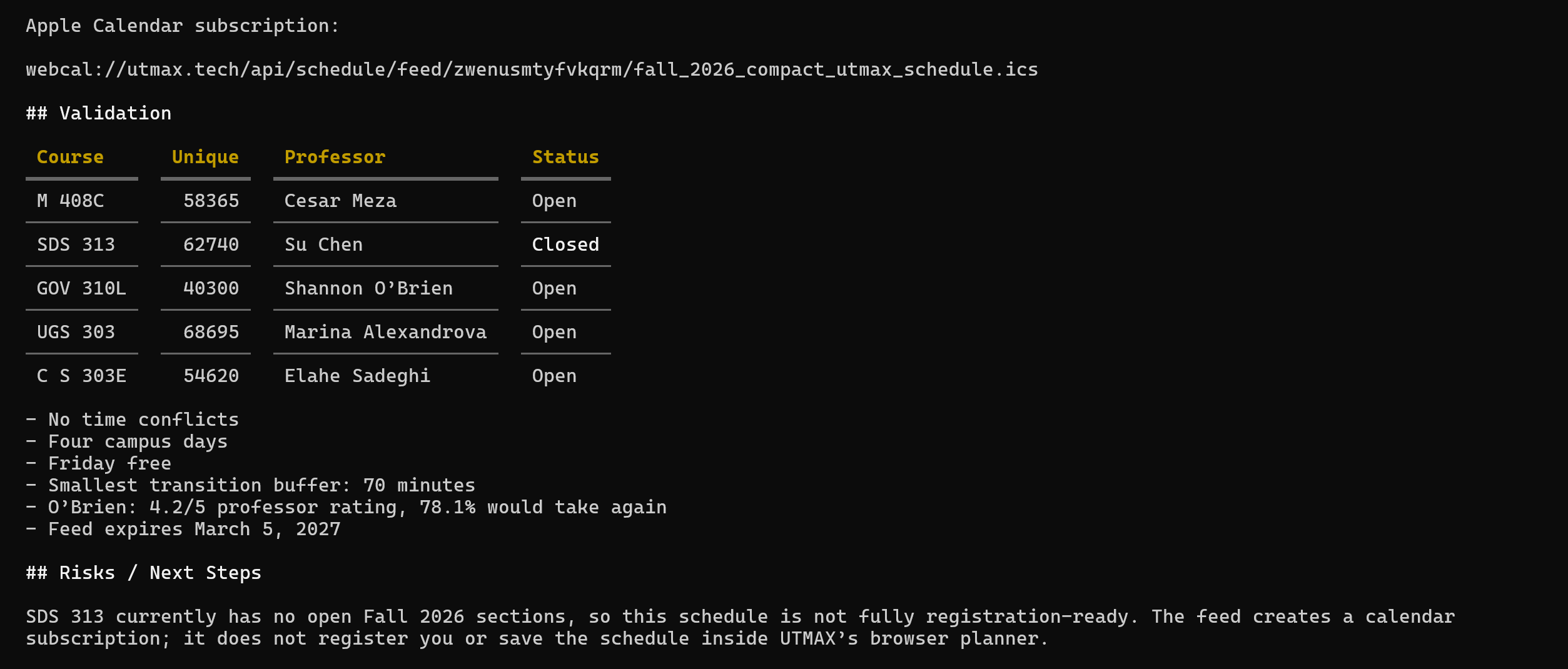
Screenshot of a real agent session after setup: the model confirmed the term, used live UTMAX tools instead of guessing, ranked candidate sections, and reported which parts of the plan were and weren’t registration-ready — the behavior the wizard’s post-install checks and server instructions are designed to produce.
Custom installs, non-interactive setup, and doctor
Automate setup in CI or dotfiles, target a client this installer doesn't know about, and verify an install after the fact.
Non-interactive (CI, dotfiles)
npx @iexdevs/utmax-mcp setup --yes --client codex,cursor,vscodeAdd --dry-run to preview, --no-skills to skip Agent Skill installs, or --json for a machine-readable summary.
Custom config destination
npx @iexdevs/utmax-mcp setup \
  --custom-config ./my-agent/mcp-config.json \
  --custom-format mcpServers \
  --custom-skill ./my-agent/skills/utmax
--custom-format accepts mcpServers, servers, context_servers, or codex-toml. Missing parent directories are only created after an explicit confirmation (or automatically under --yes).
Verify an install with doctor
OK   Node.js version — v22.14.0
OK   Package — @iexdevs/utmax-mcp 0.2.0
OK   Codex config — /home/you/.codex/config.toml
OK   Codex skill — /home/you/.agents/skills/utmax/SKILL.md
OK   MCP handshake — initialize + listTools + listResources succeeded (20 tools, 8 resources)
OK   UTMAX API reachability — https://utmax.tech

All required checks passed.
doctor checks the Node version, each client’s config and skill files, a real MCP initialize/listTools/listResources handshake, and (unless --offline is passed) whether the hosted UTMAX API is reachable. A network warning never marks the local install as broken — availability is reported separately from install success.
20 tools
Every result uses the same schemaVersion 1.0 success or error envelope, and select tools include a targeted nextActions hint.
utmax_resolve_departmentResolve a registrar code, shorthand, or department name locally.
utmax_search_coursesSearch a bounded catalog term with course and section filters.
utmax_get_course_detailsFetch exact course or unique-number section details.
utmax_lookup_professorLook up one professor through UTMAX's RMP name matcher.
utmax_compare_professorsCompare matched professor-rating summaries.
utmax_generate_schedulesGenerate bounded, conflict-free schedules with UTMAX scoring.
utmax_get_backup_sectionsRank backup sections against a supplied schedule.
utmax_simulate_registration_strategySimulate primary, backup, conflict, and fallback choices.
utmax_export_registration_payloadOrder registration choices with grade-distribution and RMP columns in the final table, without submitting.
utmax_evaluate_travelEstimate walking time between resolvable campus buildings.
utmax_optimize_travel_dayEvaluate consecutive per-occurrence schedule transitions.
utmax_find_hidden_gemsFind offered courses meeting bounded grade-history thresholds.
utmax_get_grade_historyFetch per-semester UT grade distributions for a course.
utmax_rank_sectionsRank live sections with the same grade/A-rate/RMP weights as the web app.
utmax_audit_degree_progressEstimate Core and caller-supplied course or credit progress.
utmax_add_custom_blockCreate a deterministic, non-persisted personal time block.
utmax_analyze_life_balanceAnalyze meetings and personal blocks for load and conflicts.
utmax_export_ics_to_downloadsWrite a new schedule ICS file to Downloads.
utmax_import_user_icsParse one local ICS file without changing the UTMAX planner.
utmax_publish_live_calendar_feedPublish a live Apple/Google/Outlook calendar subscription that auto-updates.
8 resources
Agents can read these versioned JSON knowledge bundles without invoking a planning operation.
utmax://personaAccuracy, uncertainty, privacy, and student-centered planning rules.
utmax://playbookRecommended sequence for catalog research and schedule recommendations.
utmax://departmentsRegistrar department codes, names, and common aliases.
utmax://preferences-guideSupported schedule-scoring preferences and ranges.
utmax://ranking-algorithmFixed weights and data sources behind utmax_rank_sections.
utmax://core-requirementsBundled course-to-UT-Core category mappings.
utmax://buildingsCommon building codes and location-resolution behavior.
utmax://personal-routine-guideNeutral input format for personal time constraints.
Data sources
What UTMAX can provide through these tools, and how official each source is.
UT Direct data synchronized by UTMAX.
UT Austin grade-distribution data.
Rate My Professors — clearly labeled unofficial.
UTMap walking estimates.
Bundled UTMAX mappings, not an official degree audit.
Local ICS files and UTMAX live calendar feeds.
Examples
Ask naturally or call a tool with explicit, bounded arguments.
Example prompts
- “Find five Fall 2026 CS 314 sections and compare their meeting times.”
- “Build schedules for CS 314, M 408C, and UGS 303 with no Friday classes.”
- “Check the walking transitions and life balance for these unique numbers.”
- “Estimate my UT Core progress, and clearly label anything unofficial.”
Direct tool call
{
  "name": "utmax_search_courses",
  "arguments": {
    "term": "20269",
    "query": "CS 314",
    "limit": 5
  }
}
Rendered response, with a nextActions hint
{
  "schemaVersion": "1.0",
  "ok": true,
  "data": {
    "term": { "termCode": "20269", "label": "Fall 2026" },
    "sections": [
      { "uniqueNumber": "54905", "courseCode": "C S 312", "professor": "BEASLEY, ANGELA CHAPPELL", "status": "closed" }
    ]
  },
  "meta": {
    "source": "utmax_search_courses",
    "generatedAt": "2026-09-06T06:04:08.785Z",
    "nextActions": [
      "Compare the strongest candidates with utmax_rank_sections before recommending one.",
      "Use utmax_get_course_details for the exact section a user wants to lock in."
    ]
  }
}
nextActions only appears on a handful of tools (course search, schedule generation, registration payload export, and calendar export/publish) so it doesn’t repeat the same promotional text on every response.
Sanitized agent transcript
A real planning session, condensed and with the live calendar feed ID redacted.
> can you make me a schedule and give me the ICS link for it I want to do M408C, SDS313, GOV310L, UGS303 and CS303E

Which term should I use — Fall 2026 (20269), Spring 2027, or another term? Once confirmed, I'll
generate the best conflict-free schedule and publish its live ICS subscription link.

> prioritize it being close to each other, make it best professors best grade distribution and
also short walks or reasonable ones, online is okay and reduce amt of days/time on campus

I'll use Fall 2026 (20269). I'll rank schedules by professor quality, grade distribution, compact
campus days, and walking distance, with online sections allowed, then publish a live ICS feed.

Called utmax_generate_schedules({ "term": "20269", "courseCodes": [...], "criteria": [...] })
  Input validation error: buildPreferences.gapWeight: Too big: expected number to be <=1

The generator caps preference weights at 1, so I'm retrying with the maximum allowed emphasis on
fewer days and tighter gaps. No course data was changed.

[... several bounded retries as the agent relaxes an infeasible 3-day cap, checks section
availability with utmax_search_courses, and compares the two open GOV 310L professors with
utmax_compare_professors before finalizing a plan ...]

The final set has comfortable transition buffers — the tightest is 70 minutes. I'm publishing the
live ICS subscription for these five sections now.

Called utmax_publish_live_calendar_feed({ "term": "20269", "uniqueNumbers": [...] })
  { "ok": true, "data": { "feedUrl": "https://utmax.tech/api/schedule/feed/«redacted»/....ics" } }

## Validation
 Course      Unique    Professor             Status
 M 408C      58365     Cesar Meza            Open
 SDS 313     62740     Su Chen               Closed
 GOV 310L    40300     Shannon O'Brien       Open
 UGS 303     68695     Marina Alexandrova    Open
 C S 303E    54620     Elahe Sadeghi         Open

- No time conflicts · Four campus days, Friday free · Smallest transition buffer: 70 minutes
- O'Brien: 4.2/5 professor rating, 78.1% would take again · Feed expires March 5, 2027

## Risks / Next steps
SDS 313 currently has no open Fall 2026 sections, so this schedule is not fully
registration-ready. The feed creates a calendar subscription; it does not register you or save
the schedule inside UTMAX's browser planner.
Troubleshooting
Common failure modes and what the installer does instead of guessing.
Install Node.js 20 or newer, then re-run the installer. `doctor` reports the exact detected version.
Some hosts spawn commands without a shell and can't resolve npx.cmd. The installer writes command: "cmd", args: ["/c", "npx", ...] on Windows for every client; if a client still fails to launch, run `doctor` to confirm the written command matches this form.
The installer refuses to touch a file it can't parse and reports "no changes made" instead of guessing. Fix the syntax error manually, or delete the utmax block and re-run setup.
The installer never overwrites a differently-configured utmax entry. Remove it manually (the exact file path is printed) or accept the difference and skip that client with --client.
Agent guidance lives in the server's `instructions` field, which most hosts only re-read after a restart. Fully restart the client (not just reload a window) after installing or upgrading.
Availability of a live data source (grades, RMP, routes) is reported separately from local MCP configuration — a network warning does not mean the local install is broken.
Limitations
UTMAX supports planning decisions, not official registration or academic certification.
- Catalog, seat, professor, grade-history, and route data can be unavailable, incomplete, or stale.
- Rate My Professors data is unofficial and limited to summary information returned by UTMAX.
- Degree progress is an estimate from bundled Core mappings and caller-supplied requirements, not an official IDA audit.
- Schedule generation does not guarantee enrollment, satisfy prerequisites, or resolve reserved-seat restrictions.
- Custom blocks and registration payloads are proposals only; tools do not mutate the UTMAX planner or browser storage.
- ICS export writes a new local file, while ICS import reads a caller-selected local file. Hosts should request approval.
- Most hosted tools require network access to
https://utmax.techand are subject to API rate limits.